- Your name in the header
- A paragraph describing what you liked about this week's computer camp.
- A paragraph giving suggestions for improving the computer camp (what do you think we could have done to help you learn more -- what would have made the camp more enjoyable).
- A list of things you learned this week.
- The picture you scanned in earlier this week.
- A Java applet (this could be one you do today or one we did
earlier). To get a Java applet on a Web page you need to add
the following tag in your HTML code:
<applet code="AppletName.class" width=320 height=300></applet>
NOTE: You replace "AppletName.class" with the name of your applet. You may also change the dimension of the applet if you wish. The Applet Wizard has been automatically generating an HTML file for you and it always used the dimensions of 320 by 200.
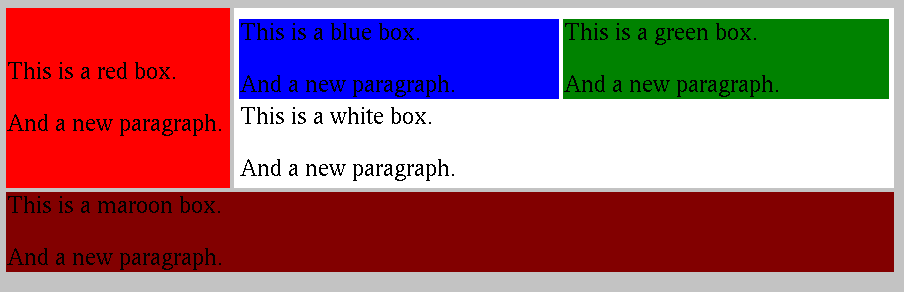
- Create a Web page, using tables, that looks like this
- Change the color of the background and of the message (choose your own colors).
- Instead of just one color for the message, have the message change color each time it is printed (alternate between at least two different colors) -- this should make your message "flash" as it scrolls by.
Graphics g = getGraphics();
Once you have the graphics object, you can call the methods for the
graphics objects as usual. For example,
g.drawRect(50, 50, 100, 100);